A natural place for the files you’re using right now.
That Drop App gives active files a place to live while you work. Nearby. Organized. Ready to send back out.
Built for macOS 14.6+. Floating shelves, screenshot capture, Finder handoff, flying hotkeys, ZIP export, rename, flatten, and conversion in one workflow.
It feels fast because it is fast.
Shelves stay close and ready when you need them.
It is built for the files you’re actively moving through the day.
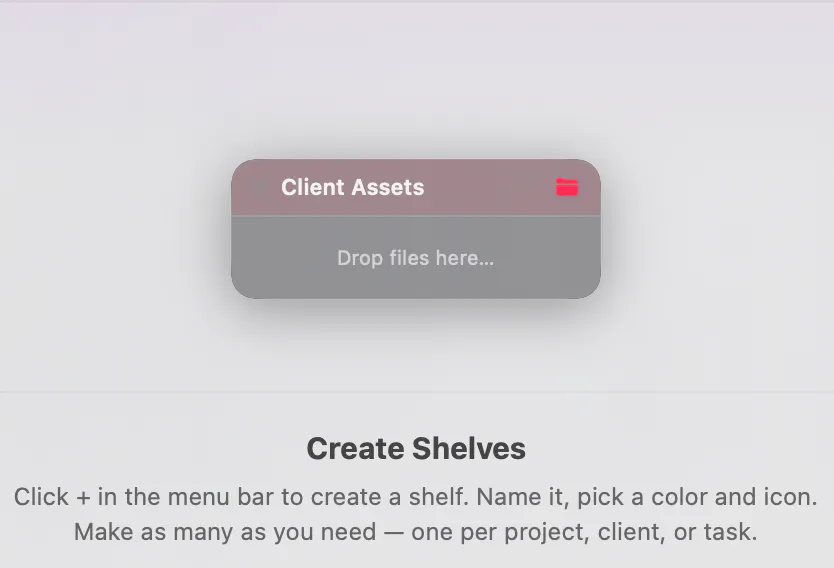
Create Shelves
Click + in the menu bar to create a shelf. Name it, pick a color and icon, and make as many as you need.
Quick actions. Clean staging. No friction.
Everything here is meant to help active files move faster, not create more interface to manage.
Floating shelves
Create shelves for projects, clients, references, or whatever you are juggling right now.
Screenshot capture
Auto capture screenshots into a chosen shelf instead of losing them daily.
Clipboard capture
Text becomes files. Images become PNGs. Loose snippets finally have a place to land.
Built-in actions
ZIP export, batch rename, flatten folders, and media conversion without leaving the shelf.
Choose the mood.
System stays native. Onyx falls away. Classic Mac is the fun one hiding in plain sight.
System
Follows macOS appearance and feels native immediately.
Onyx
Deep black premium dark for people who want the interface to fall away.
A little retro, in the best way.
The shelf still works like a modern tool, it just happens to look like the one you secretly hoped it would.
One-time purchase. Two Macs per license. Stable by default, nightly optional.
Good defaults
- Direct license covers 2 Macs.
- Nightly builds can stay optional.
- Beta access works cleanly for testers.
- Great for designers, creators, and developers.